In the rapidly evolving landscape of generative AI, the ability to not just analyze but also create and expand visual information is revolutionizing numerous fields. One of the most compelling of these technologies is AI image outpainting, a technique that allows users to extend an image beyond its original borders by generating new, contextually coherent pixels. This process, also known as generative fill or "anti-cropping," involves intelligently adding to an image rather than removing parts of it.
Powered by sophisticated deep learning models like Generative Adversarial Networks (GANs) and diffusion models, AI outpainting tools analyze the existing pixels in an image like including colors, textures, lighting, and composition to "imagine" and generate what might lie just beyond the frame. This capability is proving to be a game-changer not only for creative professionals like photographers but also for researchers in a variety of academic disciplines.
How to Prompt for Outpainting: General Principles
Effective prompt engineering is key to guiding the AI and achieving the desired results. While specifics may vary between AI tools like DALL-E, Stable Diffusion, or Midjourney, some general principles apply. The goal is to provide clear, descriptive instructions that help the AI seamlessly blend the new content with the original image.
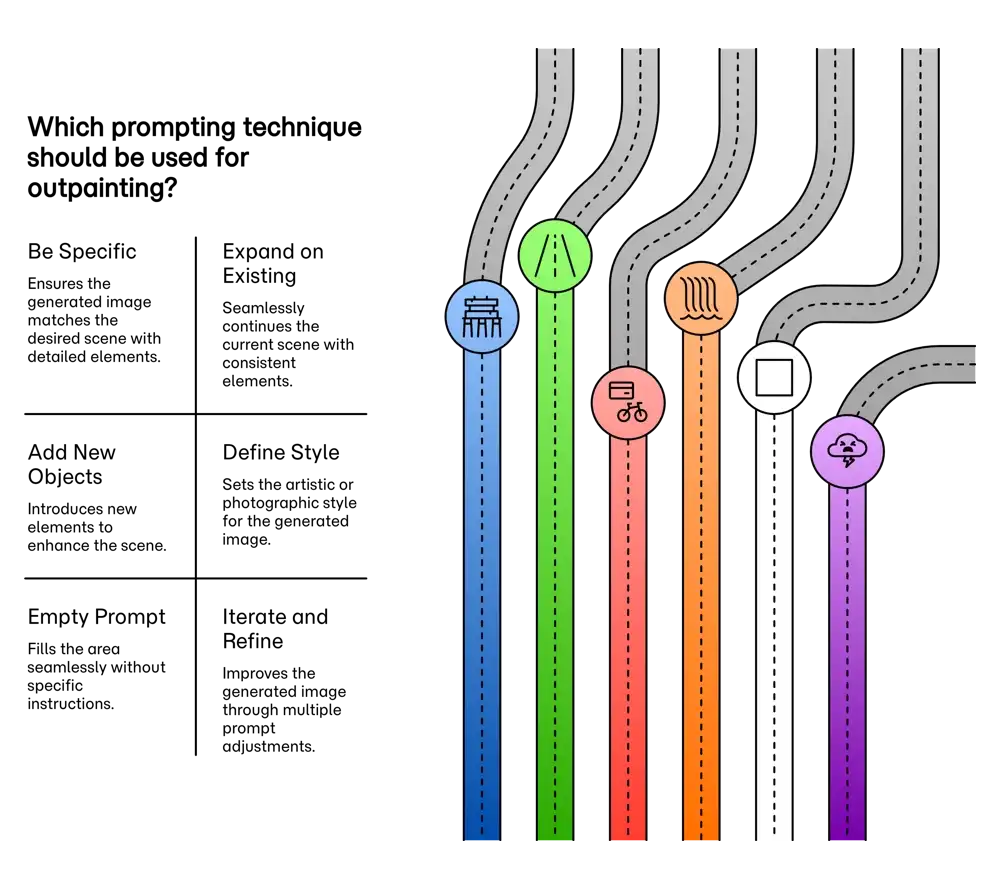
| Prompting Technique | Description | Example Prompt |
|---|---|---|
| Be Specific and Descriptive | Provide detailed descriptions of the desired scene, including objects, atmosphere, and colors. The more specific your prompt, the more likely the AI will generate your intended vision. | "A serene lake reflecting the warm colors of a sunset, with a wooden pier on the right side." |
| Expand on Existing Elements | Write a prompt that instructs the AI to continue patterns or elements already present at the edge of your photograph for a seamless extension. | "Continue the cobblestone street into the distance, lined with similar historic buildings." |
| Define the Artistic Style | Guide the AI to generate the new section in a particular style, whether it's mimicking a famous artist or a specific photographic technique to ensure consistency. | "A long exposure of a cascading waterfall with misty water over smooth rocks, in the style of a fine art photograph." |
| Iterate and Refine | Generating a better English extension may take a few tries. Experiment with different prompts and variations to achieve the best result. This prompt iterative refinement can significantly improve outcomes. | Initial prompt: "add some clouds." Refined prompt: "dramatic, stormy clouds gathering at dusk." |
AI Outpainting in Photography: Expanding the Creative Canvas
For photographers, AI outpainting opens up a world of possibilities, offering solutions to common creative and practical challenges like fixing a cramped composition or changing an aspect ratio.
Extending Landscapes and Enhancing Portraits
A stunning landscape might feel confined by its frame, or a portrait could benefit from more background context. Outpainting allows photographers to retroactively alter compositions by extending the scene. This can transform a simple headshot into an environmental portrait or turn a standard photo into a wide panorama.
| Use Case | Example Prompt |
|---|---|
| Landscape Extension | "Extend this mountain landscape to create a wide panoramic view, continuing the line of the mountains and the cloudy sky." |
| Portrait Background | "Extend the background of this portrait to show the subject sitting in a cozy, rustic café with soft, warm lighting." |
| Composition Change | "Add more of the sandy beach and the ocean to the left side of the image, maintaining the late afternoon light." |
Restoring and Repairing Old Photographs
Older photographs are often damaged with torn edges or missing pieces. While removing blemishes inside an image is technically inpainting, outpainting techniques are used to reconstruct lost information around the borders. AI can analyze the remaining parts of the image to fill in the gaps and restore the photo.
AI Outpainting in Academic Research: Reconstructing the Past
Beyond creative arts, outpainting is an emerging tool in academic research, enabling scholars to reconstruct missing information and visualize data more completely.
Archaeology, History, and Scientific Imaging
In archaeology, fragmented artifacts can be visually completed. For historical documents, AI can restore missing sections of text by learning the characteristics of the script. In fields like materials science or medical imaging, outpainting can fill in gaps in imaging data, such as from CT scans, to create more complete datasets for analysis.
| Field | Example Prompt |
|---|---|
| Archaeology | "Reconstruct the missing top portion of this ancient Roman vase, continuing the painted pattern of olive branches." |
| Photo Restoration | "Restore the missing corner of this black and white photograph, recreating the pattern of the wallpaper." |
| Scientific Imaging | "Expand this diagram of a cell to a 16:9 aspect ratio for a presentation slide, adding more of the cellular environment." |
The Future of Visual Expansion
AI image outpainting represents a fundamental shift in how we interact with and create visual media. For photographers, it offers a new layer of creative prompting control, freeing them from the constraints of the original shot. In the academic world, it provides a novel method for reconstruction and data enhancement. As these technologies improve, their applications will expand, allowing us to see not only what is, but also what might have been, just beyond the edges of the frame.
Ready to transform your AI into a genius, all for Free?
Create your prompt. Writing it in your voice and style.
Click the Prompt Rocket button.
Receive your Better Prompt in seconds.
Choose your favorite AI model and click to share.
Summary of A Guide to AI Image Outpainting
AI outpainting, also known as generative fill, is a transformative tool for photographers, allowing the extension of an image beyond its original borders. To effectively prompt an AI for outpainting, it's crucial to provide clear and descriptive text prompts. The AI analyzes pixels at the edge of your image, taking into account color, texture, lighting, and perspective to generate new content that seamlessly blends with the original photograph. Instead of vague commands, you should describe the scene you want to create in the new areas. This can involve adding objects, creating backgrounds, or simply expanding the existing environment to improve composition or change the aspect ratio. For example, if you have a tight shot of a mountain peak, you could prompt the AI to generate "a vast, cloudy sky and rolling green hills at the base of the mountain." Some advanced tools even allow for the use of negative prompting to specify elements you wish to exclude from the generated image.