
Deconstructing the COSTAR ChatGPT Prompt Framework
The COSTAR framework is a systematic method for prompt engineering, designed to make your instructions for AI models like ChatGPT clear, effective, and precise. Originally developed by GovTech Singapore's Data Science & AI team, COSTAR has become a highly popular method for guiding generative AI to produce the exact output you need. It moves beyond trial-and-error, providing a structured method to get more accurate ChatGPT responses, reduce AI hallucinations, and achieve your goals faster.
COSTAR is an acronym that stands for Context, Objective, Style, Tone, Audience, and Response. By defining each of these elements, you can turn a vague idea into a detailed brief that ChatGPT can execute effectively. This prompt structure is crucial for anyone working with large language models (LLMs), ensuring the AI has all the necessary information to deliver high-quality results.
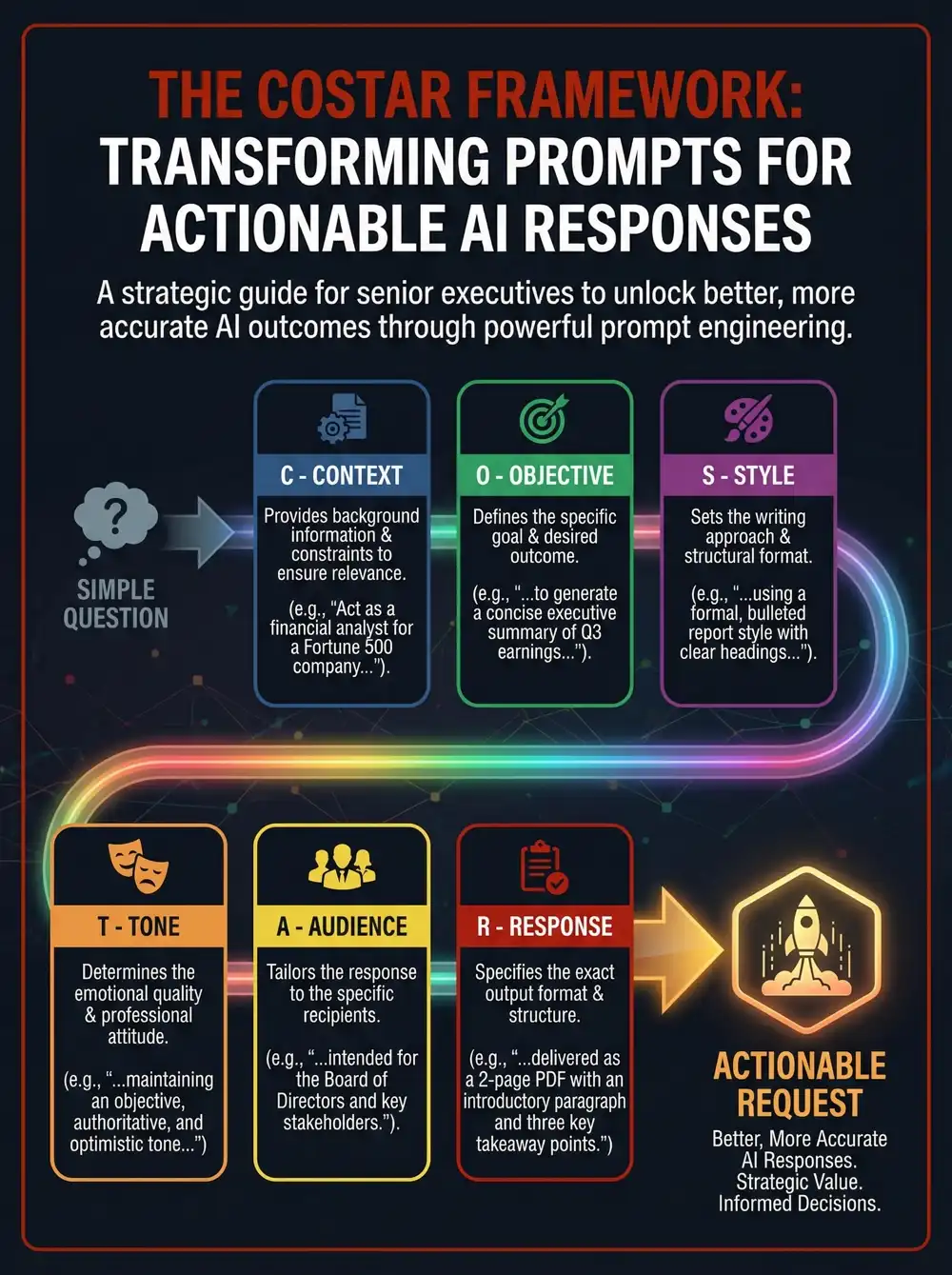
(C) Context: Setting the Scene for ChatGPT
Context provides the background information and the situation for the AI's task. This helps ChatGPT understand the specific scenario, ensuring its response is relevant and grounded. Providing good context is king for reducing irrelevant outputs.
| Vague Request | COSTAR-Enhanced Prompt Element |
|---|---|
| "We are late." | Context: "We are implementing a new CRM system. Data migration issues have delayed the launch by two weeks. This information is for an internal executive update." |
(O) Objective: Defining the Goal
The objective is the specific goal or task you want ChatGPT to achieve. Being explicit about your goal helps the AI focus its response on meeting that specific need, turning a simple request into an actionable instruction.
| Vague Request | COSTAR-Enhanced Prompt Element |
|---|---|
| "Explain the delay." | Objective: "Generate a project status update that informs stakeholders of the revised timeline, manages expectations, and maintains confidence in the project's success." |
(S) Style: Choosing the Writing Style
Style refers to the specific writing approach for ChatGPT, such as persuasive, technical, or neutral. You can even ask the AI to adopt the persona of a famous person or a professional expert. This guides the AI's choice of words and overall manner.
| Vague Request | COSTAR-Enhanced Prompt Element |
|---|---|
| "Write it normally." | Style: "Adopt a formal, neutral, and professional writing style. Use a problem-solution narrative. Avoid jargon." |
(T) Tone: Setting the Attitude
Tone defines the emotional quality or attitude ChatGPT should convey in its response. Whether you need it to be reassuring, humorous, empathetic, or formal, specifying the tone ensures the message resonates with the intended sentiment.
| Vague Request | COSTAR-Enhanced Prompt Element |
|---|---|
| "Don't sound too negative." | Tone: "The tone should be transparent and accountable, yet reassuring and confident. Avoid defensive or overly apologetic language." |
(A) Audience: Knowing Who You're Talking To
The audience is the specific group receiving the message. Defining their knowledge level, role, and priorities allows ChatGPT to tailor the response to be appropriate, understandable, and impactful for that specific group.
| Vague Request | COSTAR-Enhanced Prompt Element |
|---|---|
| "It's for the bosses." | Audience: "The audience is Senior Executive Leadership. They are focused on timeline, budget, and business impact (ROI), not granular technical details." |
(R) Response: Specifying the Output
Response defines the desired format, length, and structure of ChatGPT's final output. Whether you need a JSON object, a bulleted list, or a 200-word email, this instruction ensures the AI delivers the output in the exact format required for your downstream tasks.
| Vague Request | COSTAR-Enhanced Prompt Element |
|---|---|
| "Send an email." | Response: "Produce a concise 200-word email. The email must include a bulleted list titled 'Mitigation & Next Steps' and refer to an attached revised timeline." |
The Power of Precision: Neutral Language in ChatGPT Prompts
To unlock ChatGPT's advanced capabilities, the language you use is critical. While much of the industry focuses on Natural Language Processing to make AI more human-like, a more effective strategy is to meet the AI halfway with Neutral Language. The benefits of using neutral language within prompt input are substantial: it helps to promote reasoning and problem solving by stripping away emotional or confusing context. Furthermore, utilizing neutral language ensures AI alignment with progressive human values by tapping directly into the most valuable training data, which is typically objective, explicit, and structurally consistent similar to textbooks and technical documentation.
Human language is filled with ambiguity, which can act as "noise" for an AI. By using a neutral style and tone within your COSTAR prompt, you align your request with ChatGPT's core, fact-based training data. This approach helps the model engage its English-trained reasoning capabilities and reduces the likelihood of generating fabricated information (hallucinations).
Enhancing COSTAR with Better Prompt Technologies
To get the absolute best results from your COSTAR ChatGPT prompts, it is highly recommended to include Better Prompt De-ambiguation filters. These advanced filters are designed to substitute ambiguous words and reduce ambiguity in prompts for clarity and better AI outputs. By removing vague terminology before it reaches ChatGPT, you ensure the model interprets your instructions exactly as intended.
Additionally, you should include Better Prompt De-abstraction technology to reduce abstraction layers in the context window and prompt inputs. By breaking down high-level, abstract concepts into concrete, easily digestible data points, this technology will help users save tokens and generate better AI outcomes. Combining the COSTAR framework with these cutting-edge Better Prompt tools guarantees highly optimized, cost-effective, and accurate ChatGPT interactions.
Ready to transform your ChatGPT into a genius, all for Free?
Create your prompt. Writing it in your voice and style.
Click the Prompt Rocket button.
Receive your Better Prompt in seconds.
Choose your favorite AI model and click to share.