In the world of AI art, the pursuit of perfection often misses a crucial point: reality isn't perfect. While artists and engineers push for flawless resolution and lighting, a growing movement finds beauty in deliberate flaws. This practice of "intentional imperfection" aims to improve realism and creative expression by mimicking the quirks of traditional photography. For personal enjoyment and artistic exploration, guiding AI to create these "happy accidents" can transform a sterile digital image into something with soul.
Real photographs are affected by countless variables light flares, film grain, motion blur. Our brains recognize these imperfections as signs of authenticity. An AI image that is too clean can feel artificial, landing it in the uncanny valley. By intentionally adding subtle photographic flaws, creators can give their AI-generated images a sense of history, mood, and believability.
The Language of Imperfection: A Photographer's Lexicon
Guiding an AI to create imperfections is a nuanced art that involves advanced prompt engineering. This means moving beyond simple subjects and using the language of photography, including specific cameras, lenses, and film stocks. For instance, instead of "portrait of a woman," a more effective prompt is, "Close-up portrait of a woman, shot on a Nikon Z9 with a 50mm f/1.4 lens, natural window light."
An easy way to start is by adding keywords that suggest texture and age. You can enhance prompts with terms like "subtle dust particles," "faint fingerprints," or "tiny scratches." For authentic portraits, specificity is key to avoiding the "plastic skin" effect. A better prompt might be: "Hyper-detailed skin texture, subtle pores, fine facial hair, slight skin imperfections." These prompts guide the AI to render the nuanced imperfections that define naturalism.
Harnessing the Power of Negative Prompts
While positive prompts add elements, negative prompting is just as important for telling the AI what to avoid. This is a powerful technique for eliminating the overly polished look that many AI models default to. To encourage a more naturalistic output, you might use negative prompts such as "--no plastic skin, glossy, airbrushed" or "--no perfect symmetry." By telling the generator to avoid signs of digital perfection, you create space for a more organic result.
Simulating Photographic Phenomena
For those looking to push their creative expression, AI models can be directed to replicate specific photographic effects often seen as flaws. These effects can be grouped into categories to better organize your text-to-image prompting efforts.
Light and Lens Effects
Lens flare, once an unwanted artifact, is now a cinematic tool. AI generators respond well to specific flare vocabulary like "soft lens flare" or "anamorphic lens flare." It's best to justify the light source in your prompt, such as, "sunrise over a mountain, dramatic starburst lens flare." Similarly, effects like vignetting and distortion can be added by referencing specific camera types.
| Type of Imperfection | Method to Introduce Flaw | Example Prompt Element |
|---|---|---|
| Lens Flare & Light Leaks | Incorporate these elements directly into the prompt to simulate light hitting the sensor or lens in an uncontrolled way. | "Photo with a warm light leak on the side," "cinematic lens flare." |
| Lens Distortion & Vignetting | Incorporate camera and lens types known for these effects. Use terms like "shot on a cheap film camera" or "dark corners." | "A portrait with slight barrel distortion," "image with noticeable vignetting." |
| Chromatic Aberration | Mention this technical flaw directly or use terms describing vintage or low-quality lenses. | "Subtle chromatic aberration on the edges," "photograph with purple fringing." |
Texture and Analog Feel
The granular texture of film is a powerful way to add warmth and a vintage aesthetics to an image. You can evoke this by including prompts that mention specific film stocks, like "shot on Kodak Portra 400," or by simply adding "film grain." Some external tools also allow for adding a film grain effect as a post-processing step.
| Type of Imperfection | Method to Introduce Flaw | Example Prompt Element |
|---|---|---|
| Film Grain & Noise | Add descriptions of film stock or low-light conditions. Many AI generators have specific "grain" or "noise" parameters. | "Shot on Kodak Portra 400 film," "a grainy black and white photo." |
| Over-Sharpening | This can be an automatic artifact in some models or added in post-production. | "Early digital photography," "heavily edited." |
Color and Focus
Slight color shifts can mimic the look of certain cameras or processing techniques. You can prompt for specific color-grading styles, such as "cross-processed," to yield interesting and unpredictable color shifts. Introducing blur can also add dynamism. Prompts can include "motion blur" or specify camera settings like a shallow depth of field ("f/1.8 aperture") to create a beautifully blurred background.
| Type of Imperfection | Method to Introduce Flaw | Example Prompt Element |
|---|---|---|
| Color Shifts | Specify a particular color cast or imbalance in the prompt. Use terms associated with vintage film or cheap lenses. | "Slight green color shift in the shadows," "warm vintage color bleed." |
| Motion Blur & Soft Focus | Describe the scene as being in motion or specify a shallow depth of field using photographic terms. | "Action shot with motion blur," "portrait with a soft, dreamy focus." |
A New Canvas for Creativity
Learning to intentionally introduce imperfections into AI-generated images opens up a new frontier for personal enjoyment and creative prompting. It's a move away from a purely technical pursuit of perfection and a step toward a more intuitive, artistic approach. By understanding the language of photography and the nuances of how diffusion models work, anyone can learn to guide these powerful tools to create images that are not just visually stunning, but also emotionally resonant and convincingly real. The beauty, it turns out, is often in the subtle flaws.
Ready to transform your AI into a genius, all for Free?
Create your prompt. Writing it in your voice and style.
Click the Prompt Rocket button.
Receive your Better Prompt in seconds.
Choose your favorite AI model and click to share.
Summary of Embracing Intentional Imperfection
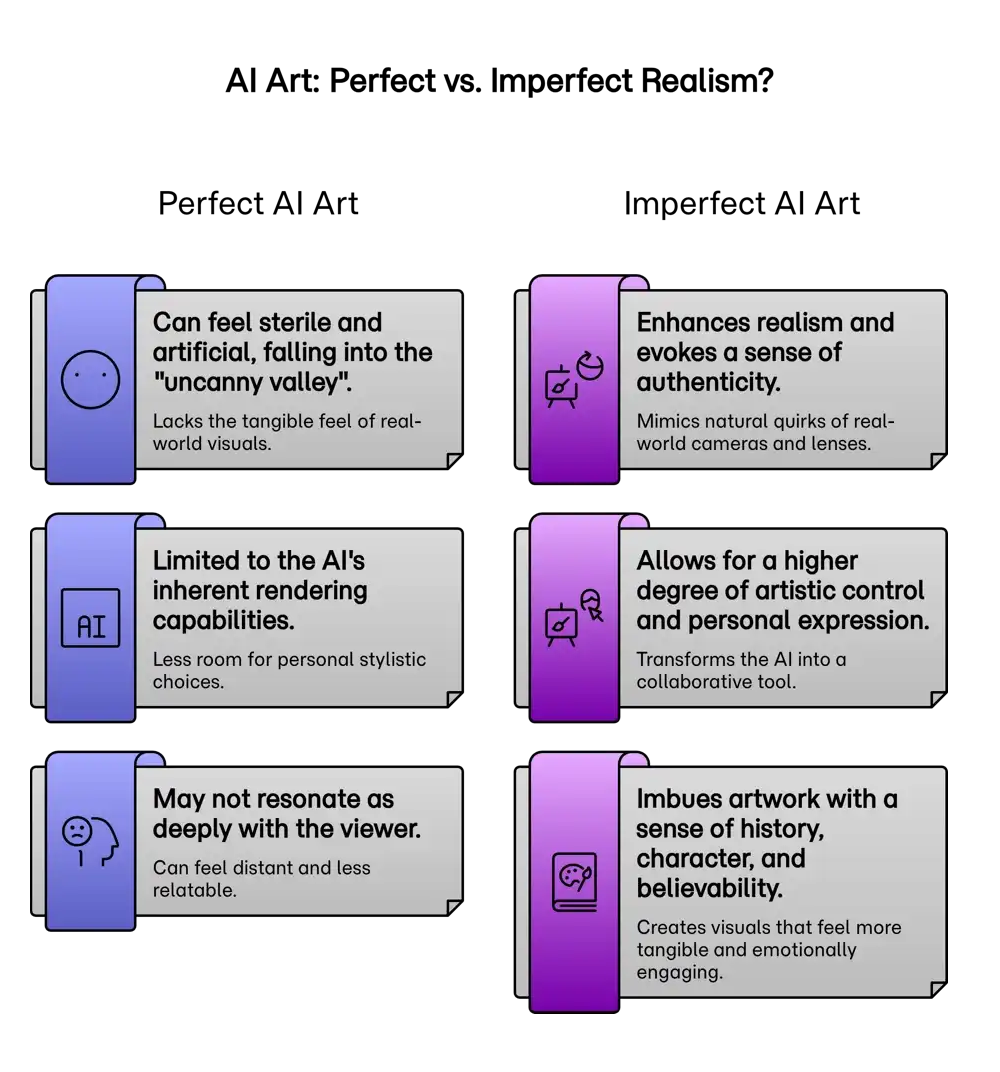
Intentionally introducing subtle photographic flaws into AI-generated art is a creative technique used to enhance realism and evoke a sense of authenticity. Perfectly rendered AI images can sometimes feel sterile and artificial, falling into the "uncanny valley" where they are almost, but not quite, real. By deliberately adding imperfections such as over-sharpening, color shifts, lens distortions, and film grain, creators can mimic the natural quirks of real-world cameras and lenses. This practice moves beyond simple generation, allowing for a higher degree of artistic control and personal expression. The goal is not to create a technically "flawed" image, but to imbue the artwork with a sense of history, character, and believability that resonates more deeply with the viewer. This approach transforms the AI from a mere generator of perfect images into a collaborative tool for crafting visuals that feel more tangible and emotionally engaging.