In the ever-evolving landscape of digital imagery, photo retouching has become an essential step in creating compelling visuals. It is no longer a futuristic concept but a present-day reality, transforming how we enhance and perceive photographs. The process ranges from basic adjustments to intricate refinements, with tools available for both manual and automated workflows. These technologies are democratizing professional-level photo editing prompt, making it accessible for a wide range of creative and educational purposes.
The Evolution of Retouching: From Manual Craft to AI Automation
At its core, photo retouching uses various techniques to analyze and manipulate images with remarkable precision. Traditionally, this was a meticulous manual process done by skilled artists using software like Adobe Photoshop. Techniques like "dodge and burn" and frequency separation are powerful methods used by professionals to achieve flawless results. Today, while manual retouching is still the gold standard for high-end, detailed work, artificial intelligence (AI) has introduced a new dimension of speed and efficiency. AI-powered systems are trained on vast datasets, enabling them to learn the nuances of a high-quality photograph and automate complex tasks that once required hours of labor. This hybrid approach, using AI for bulk processing and manual techniques for hero images, is becoming a popular workflow.
Enhancing Brightness, Contrast & Saturation
Fundamental to photo retouching is the adjustment of brightness, contrast, and saturation to make photos more vibrant and eye-catching. Manual methods in software like Lightroom give photographers precise control over these elements using tools like exposure sliders, contrast adjustments, and tone curves. AI-powered tools, on the other hand, can analyze an image's histogram and pixel distribution to make localized and context-aware corrections automatically. This means they can brighten shadowed areas without overexposing highlights, resulting in a balanced and visually pleasing image.
| Enhancement | Manual Method | AI-Powered Method |
|---|---|---|
| Brightness, Contrast & Saturation | Utilizes tools like Levels, Curves, and selective adjustments to give the editor full creative control over the image's light and color. | Analyzes the image to automatically balance light, shadows, and color vibrancy for quick, consistent results. |
A Flawless Finish: Refining Skin
One of the most impressive applications of retouching is its ability to refine skin with subtlety and realism prompt. Traditional skin retouching can be a time-consuming process, often involving techniques like frequency separation to smooth blemishes while preserving natural skin texture. AI takes a more automated approach, employing advanced algorithms to identify and remove blemishes, freckles, and wrinkles. The goal is to create a polished yet authentic look that maintains the original essence of the photograph, avoiding an unnatural "plastic" appearance.
| Refinement | Manual Method | AI-Powered Method |
|---|---|---|
| Skin Blemishes & Wrinkles | Uses tools like the Healing Brush and Clone Stamp, often combined with frequency separation, for precise, detailed control over skin texture and tone. | Automatically detects and smooths imperfections while attempting to preserve natural skin texture, ideal for high-volume work. |
Brightening Smiles and Eyes
Retouching also extends to detailed enhancements like whitening teeth and brightening eyes. Manually, this requires careful selection of the teeth or eyes and subtle adjustments to brightness and color to avoid an unnatural look. AI simplifies this by automatically detecting these features in a photograph and applying subtle brightening and color correction to reduce yellowing in teeth or add sparkle to eyes, making the subject's gaze more captivating.
| Enhancement | Manual Method | AI-Powered Method |
|---|---|---|
| Teeth Whitening & Eye Brightening | Involves precise masking and selective color/brightness adjustments to ensure a natural and believable enhancement. | Automatically identifies teeth and eyes to apply targeted brightening, offering a quick and convenient solution. |
A Playground for Creativity: Retouching in Digital Art
Beyond simple corrections, photo retouching tools are opening up new avenues for creativity. Artists and designers use these tools for everything from backgrounds prompt removal to integrating subjects into new environments. AI is also capable of removing unwanted objects from images with remarkable precision through inpainting prompt. Furthermore, some AI tools can transform a photograph into a piece of art in the style of a famous painter, a technique known as neural style transfer. This capability allows artists and hobbyists alike to explore new creative territories and even generate new visual elements from simple text descriptions.
An Enlightening Tool: Educational Applications of Photo Retouching
The educational potential of photo retouching is vast. A primary application is the nostalgia prompt of old and damaged photographs. By digitizing an image with a high-resolution scanner, restorers can use digital tools to repair scratches, tears, and spots, as well as restore faded colors, bringing historical moments and cherished family memories back to life. This holds immense value for historical preservation. In the classroom, image enhancement can turn low-quality visuals into sharp, high-resolution educational materials, making complex concepts easier for students to understand.
Ready to transform your AI into a genius, all for Free?
Create your prompt. Writing it in your voice and style.
Click the Prompt Rocket button.
Receive your Better Prompt in seconds.
Choose your favorite AI model and click to share.
Summary of Photo Retouching
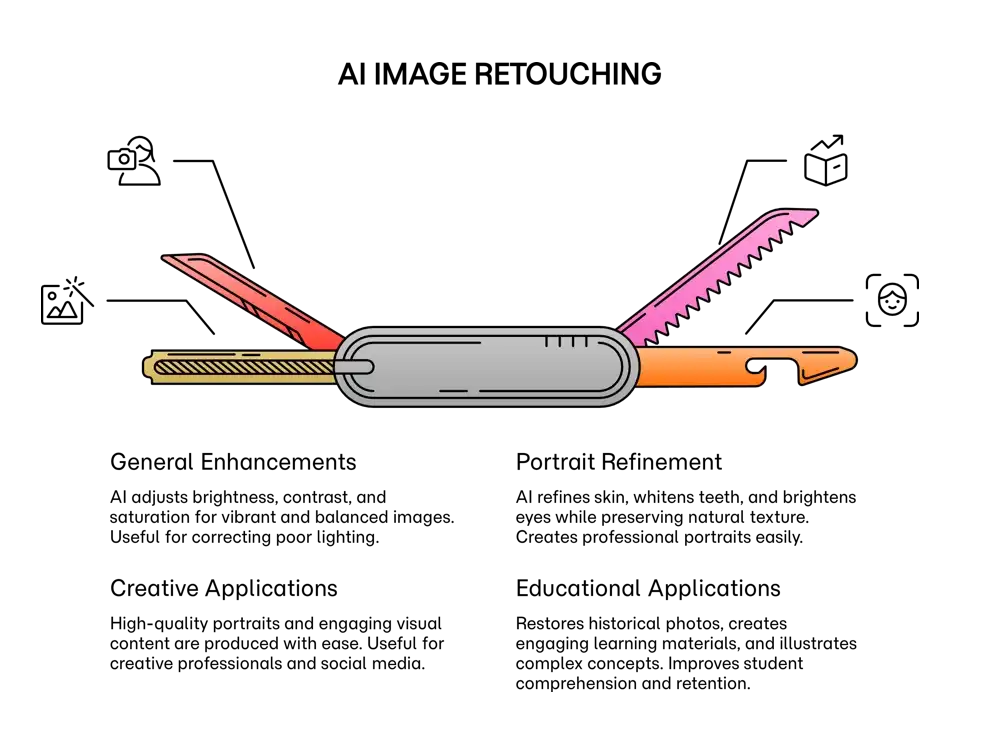
Image retouching tools, whether manual or powered by artificial intelligence, fundamentally transform how visual content is created and refined. These editors analyze images to intelligently enhance core visual elements. They can adjust brightness, contrast, and saturation to produce more vibrant and balanced images, which is useful for correcting photos and making them appear more professional. Beyond general enhancements, these tools excel at detailed portrait refinement. Sophisticated algorithms and manual techniques can be used to create authentic portraits by smoothing skin blemishes and wrinkles while preserving natural texture. Furthermore, these systems can whiten teeth and brighten eyes to make a subject appear more vibrant. For creative professionals, this means producing high-quality portraits for everything from professional head shots prompt to social media. In educational settings, these tools can restore historical photographs and create more engaging learning materials, thereby improving student comprehension.