In today's visually driven world, a polished image is essential for making a strong first impression. Photo retouching is the process of enhancing an image by correcting imperfections, adjusting colors, and improving overall quality. This can range from subtle blemish removal on a portrait to complex object removal in a commercial photograph. Traditionally a manual process done by skilled artists, photo touch-ups are now also being revolutionized by artificial intelligence, making professional results more accessible than ever.
From Casual Photo to Polished Image: Key Techniques
Transforming a standard photograph into a professional-grade image involves a variety of techniques, which can be broadly categorized into manual methods and AI-powered solutions. The best approach often involves a hybrid of both, using AI for speed and manual editing for precision and creative control.
Manual Retouching Techniques
Professional retouchers use a suite of powerful tools to achieve a flawless but natural look. These non-destructive editing techniques preserve the original image, allowing for adjustments without permanent changes. Common methods include:
- Blemish and Object Removal: Using tools like the Spot Healing Brush and Clone Stamp, editors can remove minor imperfections such as skin blemishes, stray hairs, or distracting objects in the background.
- Frequency Separation: This advanced technique separates an image's texture from its color and tone, allowing for skin smoothing while preserving natural skin texture like pores.
- Dodge and Burn: A classic technique used to enhance contrast and dimension by selectively lightening (dodging) and darkening (burning) specific areas of an image.
- Color Correction: Adjusting color balance, hue, and saturation is crucial for correcting color casts, enhancing skin tones, and ensuring the image has a consistent and appealing look.
AI-Powered Touch-Ups
A new wave of technology is democratizing image editing through generative AI. AI headshot generators and photo editing tools leverage sophisticated machine learning algorithms to transform ordinary photos into polished, studio-quality images. The process is often as simple as uploading a photo and letting the AI work its magic. This transformation is achieved through a variety of automated techniques:
- Background Replacement: Instantly swap a cluttered room for a clean, professional backdrop. A well-crafted backgrounds prompt can generate a variety of settings.
- Lighting Adjustments: AI can correct uneven lighting, remove harsh shadows, and apply lighting patterns that mimic a professional studio setup.
- Clothing and Style Customization: Many platforms allow you to virtually change your attire, letting you experiment with different outfits to find a better English look.
- Blemish Removal and Skin Smoothing: AI-powered retouching prompt tools can remove blemishes and smooth skin for a flawless yet natural look. The key is achieving a sense of naturalism without over-editing.
The Power of Retouched Images Across Industries
The applications for professionally edited images are vast and extend across numerous fields, enhancing everything from personal brands to major advertising campaigns.
Ready to transform your AI into a genius, all for Free?
Create your prompt. Writing it in your voice and style.
Click the Prompt Rocket button.
Receive your Better Prompt in seconds.
Choose your favorite AI model and click to share.
Summary of Photo Touch-Up Applications
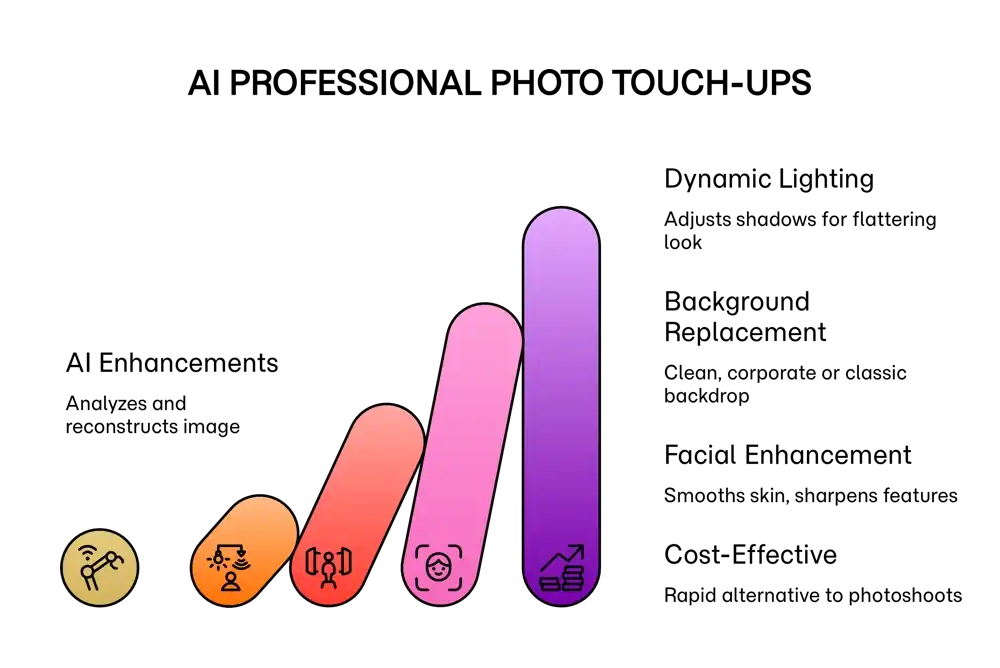
Artificial intelligence and manual editing techniques are revolutionizing digital imagery, offering powerful tools that can transform a casual photo into a professional, studio-quality headshot or a polished piece of marketing content. This process involves a suite of enhancements that analyze and reconstruct the original image. Key techniques include adjusting lighting, replacing backgrounds, and facial enhancement. This transformation provides a cost-effective and rapid alternative to traditional photoshoots, democratizing access to high-quality images for a multitude of uses and improving our digital representation and digital identity.
| Technique | Manual Approach like Photoshop | AI-Powered Approach |
|---|---|---|
| Blemish Removal | Uses Spot Healing or Clone Stamp tools for precise removal of imperfections. | Automatically detects and smooths skin, removes blemishes in one click. |
| Background Removal | Requires meticulous selection with tools like the Pen Tool or Magic Wand. | One-click background removal and replacement. |
| Teeth Whitening | Involves creating a selection and adjusting hue/saturation and brightness. | Often included in automated portrait enhancement features. |
| Lighting/Contrast | Uses Dodge and Burn tools, Curves, and Levels for precise control. | Automatically balances exposure and contrast for a more dynamic look. |
| Field | Application of Edited Images |
|---|---|
| Marketing & Advertising | Creates consistent team headshots and rapidly produces customized visuals for ad campaigns, social media, and e-commerce product photos. A good prompt for advertising can generate compelling lifestyle imagery. |
| Personal & Professional Branding | Enhances profiles on platforms like LinkedIn with a polished professional head shots prompt, projecting a more credible image. |
| Art & Creativity | Artists use AI and manual editing to explore new creative forms, turning photos into stylized artworks or creating entirely new visual concepts with a focus on realism prompt techniques. |
| Personal Use | Individuals can create polished yearbook photos, restore old family pictures, or simply improve their personal photos for sharing. |