
In the rapidly evolving landscape of generative AI, creating visually striking images from text is now commonplace. However, a persistent challenge holds these models back from true photorealism: the correct rendering of light and shadow. These shadow imperfections ranging from misplaced shadows to physically impossible lighting can make an otherwise impressive image feel subtly wrong or fall into the uncanny valley. Understanding these flaws is the first step toward overcoming them and unlocking the next level of AI-driven creativity.
Why AI Struggles with Shadows
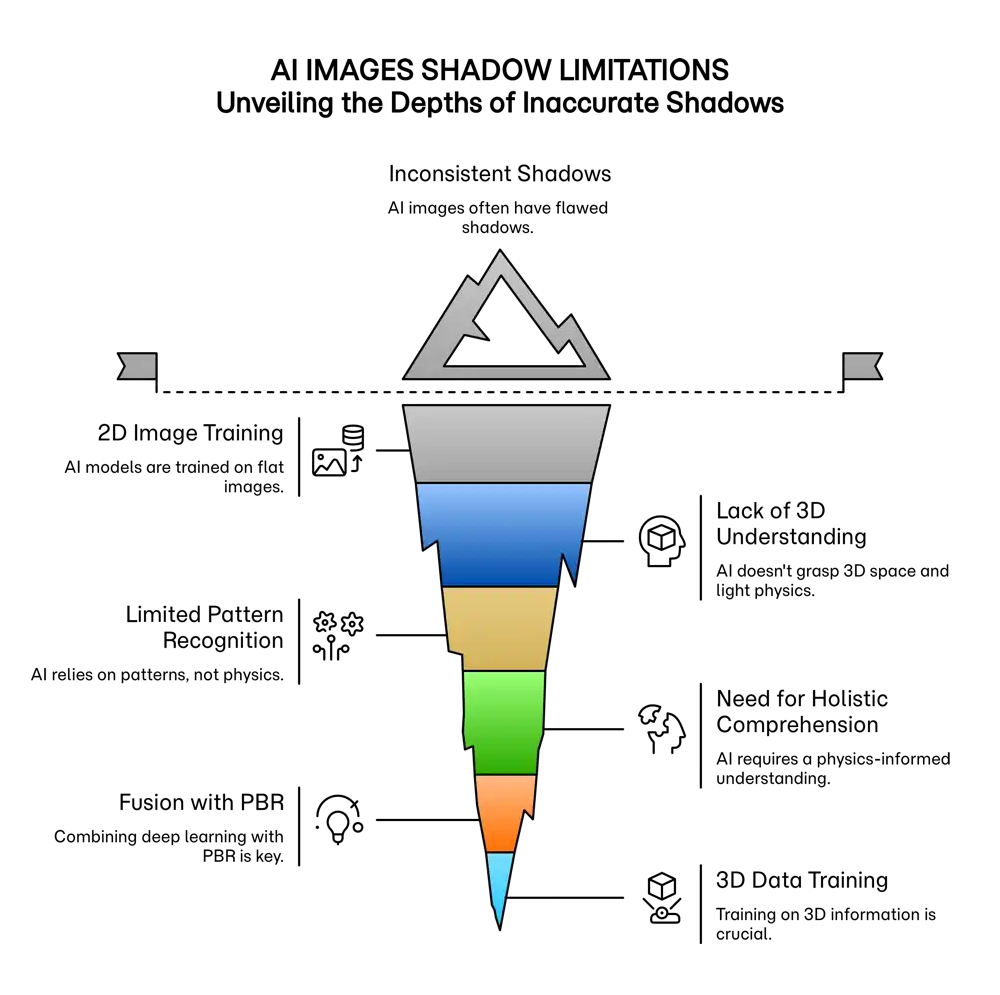
The core of the problem lies in how most AI image models, like diffusion models and GANs, are trained. They learn from an enormous library of 2D images, identifying patterns to associate words with visual data. This process doesn't teach the AI the fundamental physics of light, 3D geometry, or how objects interact in a physical space. As a result, the AI often produces shadows based on statistical likelihood rather than a genuine understanding of the scene. It knows a shadow should be *near* an object, but not necessarily how its shape, direction, or softness is determined by the light source and surrounding environment. This leads to common and noticeable errors that break the illusion of realism.
Illuminating the Path Forward: How AI is Learning Physics
To fix these imperfections, researchers are developing new methods that integrate the laws of physics directly into the model training process. This emerging field of artificial intelligence is focused on moving beyond 2D pattern recognition to a more robust, 3D-aware understanding of the world.
One groundbreaking approach is **generative physically based rendering (gPBR)**. This technique combines the creative power of generative models with the precision of traditional computer graphics, which simulates how light actually behaves. By using gPBR, AI can create images that are not just visually plausible but physically accurate, with correct reflections, refractions, and shadows. Another key innovation is the use of **physics-informed neural networks (PINNs)**, which embed physical laws as constraints during training, forcing the AI to generate results that obey the principles of light transport.
Furthermore, **Neural Radiance Fields (NeRFs)** are revolutionizing scene reconstruction. NeRFs create a 3D representation of a scene from a set of 2D images, allowing for the generation of new views with incredibly realistic lighting. Specialized models like Shadow-NeRF and NR-Hints use shadows as crucial information to better understand a scene's geometry, leading to more accurate and dynamic lighting in the final render. These technologies are paving the way for AI to finally grasp the intricate dance of light and shadow.
A New Canvas for Artists and Storytellers
As AI masters light and shadow, it will become an even more powerful partner for artists and creators. With physically accurate lighting, artists can generate concept art, landscapes, and authentic portraits with a greater sense of depth and emotional impact. This shift allows creators to focus more on high-level creative decisions like composition and storytelling, leaving the technical rendering to the AI. For authors and filmmakers, the ability to generate storyboards or character concepts with consistent, evocative lighting will open new frontiers in visual narrative. This evolution in text-to-image prompt technology is not about replacing human creativity but augmenting it, offering powerful new tools to bring visions to life.
Ready to transform your AI into a genius, all for Free?
Create your prompt. Writing it in your voice and style.
Click the Prompt Rocket button.
Receive your Better Prompt in seconds.
Choose your favorite AI model and click to share.
Common Shadow Imperfections and Their Solutions
AI-generated shadows often fail in predictable ways. Below are common types of imperfections, why they happen, and how they are being addressed.
Physical Inaccuracy
This is the most frequent issue, where shadows defy basic physics. They might appear at the wrong angle relative to the light source, be too sharp or blurry for the conditions, or be missing entirely. This happens because the model lacks a true 3D understanding of the scene.
| Imperfection Example | Why It Happens | The Solution |
|---|---|---|
| A shadow is cast in the opposite direction of a visible sun. | The model is trained on 2D images and doesn't understand the geometric relationship between a light source, an object, and its shadow. | Training with 3D data and physics-informed models (PINNs) that enforce the laws of light transport. |
Lighting Incoherence
In complex scenes, AI can struggle to maintain a single, consistent light source. One object might be lit from the left, while another is lit from the right, creating a disjointed and unnatural image.
| Imperfection Example | Why It Happens | The Solution |
|---|---|---|
| In a group portrait, one person has shadows indicating a light source from the right, while another's shadows point to a light source from the left. | The AI stitches together elements from its training data without enforcing a scene-wide lighting logic. | Using Neural Radiance Fields (NeRFs) to build a cohesive 3D representation of the scene, ensuring all elements are lit consistently. |
Poor Object and Surface Interaction
Shadows should wrap around and bend over the surfaces they fall upon. AI often generates flat shadows that don't interact realistically with the geometry of the environment or other objects.
| Imperfection Example | Why It Happens | The Solution |
|---|---|---|
| The shadow of a person standing on stairs is a flat shape on the ground, ignoring the steps. | The model fails to comprehend the spatial relationship between different objects and surfaces in the scene. | Training on synthetic 3D environments and using techniques like shadow mapping in NeRFs to simulate how shadows are cast onto complex geometry. |
Ignoring Material Properties
The appearance of a shadow is affected by the material it is cast upon or passes through. AI often overlooks these properties, treating all surfaces the same. For example, it may not correctly render the soft, diffused shadow cast through a semi-transparent object.
| Imperfection Example | Why It Happens | The Solution |
|---|---|---|
| A shadow cast on a glass surface appears as opaque as one cast on concrete. | Standard training datasets lack sufficient information to teach the model how light interacts with diverse material properties like transparency and reflectivity. | Advanced rendering models that can be trained to recognize and simulate material properties, such as those used in generative physically based rendering (gPBR). |